In short: keyword segmentation means tagging every search term you track with business labels, such as product line, customer type and buying intent, so you can report on what matters to the business rather than on a long list of individual rankings. It sounds simple, but very few businesses do it, and it’s one of the quickest ways to turn search data into decisions.
What is keyword segmentation?
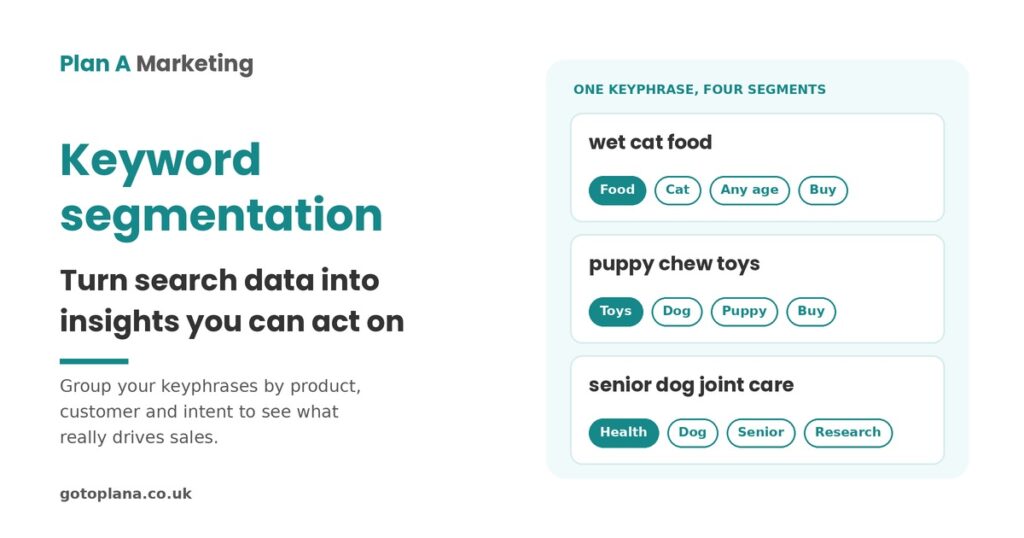
Keyword segmentation is the process of grouping the keyphrases (search terms) you track into categories that match how your business actually works. Instead of asking “where do we rank for wet cat food?”, you ask “how visible is our cat food range compared with our dog food range, and which one is growing?”
It’s related to, but different from, customer segmentation. Customer segmentation groups the people who buy from you. Keyword segmentation groups the searches people make before they find you.
Why keyword-by-keyword reporting falls short
Most search reporting looks like this:
- Organic search: rankings and traffic for individual terms and pages.
- Paid search: average position, cost per click and Quality Score by term, campaign or ad group.
- Analytics: traffic and engagement by page or keyword.
That detail is useful to the person running the campaigns. It’s much less useful to an MD or business owner. They rarely care about the difference between a plural and a singular term. They care about sales, visibility against competitors and which product lines are winning or losing.
Search is also usually only one slice of the overall marketing budget, so it gets a similar slice of the decision-maker’s attention. Every recommendation has to count. Staring at keyword-level data also traps you in a search mindset, rather than seeing results the way customers and the business see them.
A worked example: segmenting keyphrases for a pet care brand
Imagine a fictional pet care brand tracking around 200 keyphrases, including:
- cat litter
- wet cat food
- puppy chew toys
- feline shampoo
- doggy treats
- kitty brush
Most reports stop at ranking and search volume, with perhaps a “category” column. Keyword segmentation adds columns that reflect the business:
| Keyphrase | Product type | Animal | Life stage | Search intent |
|---|---|---|---|---|
| wet cat food | Food (wet) | Cat | Any | Transactional |
| puppy chew toys | Toys | Dog | Puppy | Transactional |
| feline shampoo | Grooming | Cat | Any | Commercial |
| how often to bath a senior dog | Grooming | Dog | Senior | Informational |
The right labels differ for every business. The test is simple: would this label change a decision?
Segment by product type
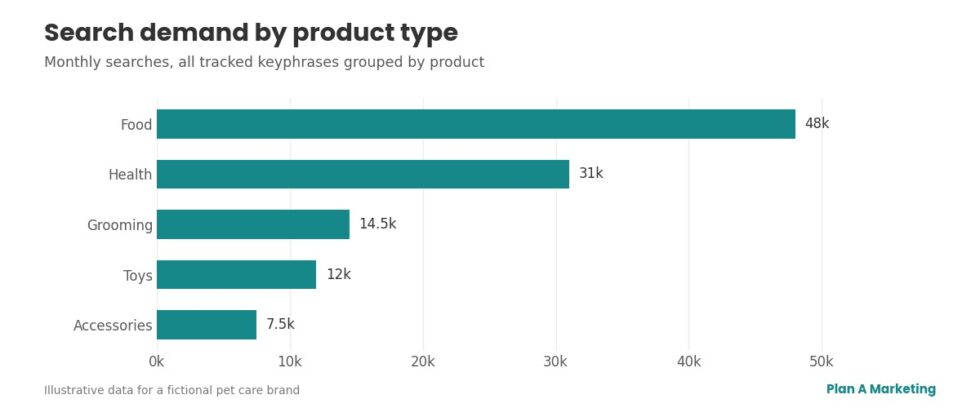
Rolling search volume and visibility up by product type gives a high-level view of where demand sits: food, grooming, toys, health.
<img src=”kseg-chart-1-product-type.jpg” alt=”Bar chart of monthly search demand by product type, with food highest, then health, grooming, toys and accessories” width=”1200″ loading=”lazy” />
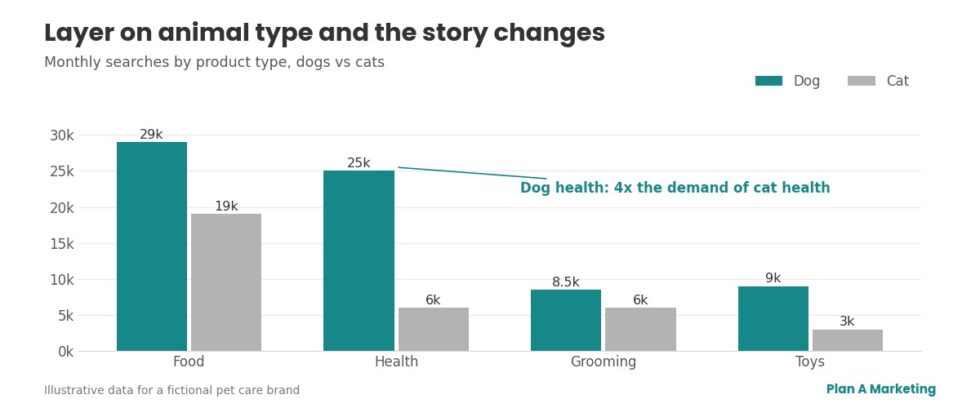
Layer on animal type
Now combine product type with animal type. In our example, this might reveal large demand for dog health terms but comparatively little for cat health. That’s a content and budget decision, not a ranking report.
<img src=”kseg-chart-2-animal-type.jpg” alt=”Grouped bar chart comparing dog and cat search demand by product type, showing dog health searches at around four times cat health” width=”1200″ loading=”lazy” />
Segment by search intent
Search intent is what the person is trying to do:
- Informational: looking for an answer (“how often to worm a puppy”).
- Commercial: comparing options (“best grain-free dog food”).
- Transactional: ready to buy (“buy cat litter online”).
- Navigational: looking for a specific brand or site.
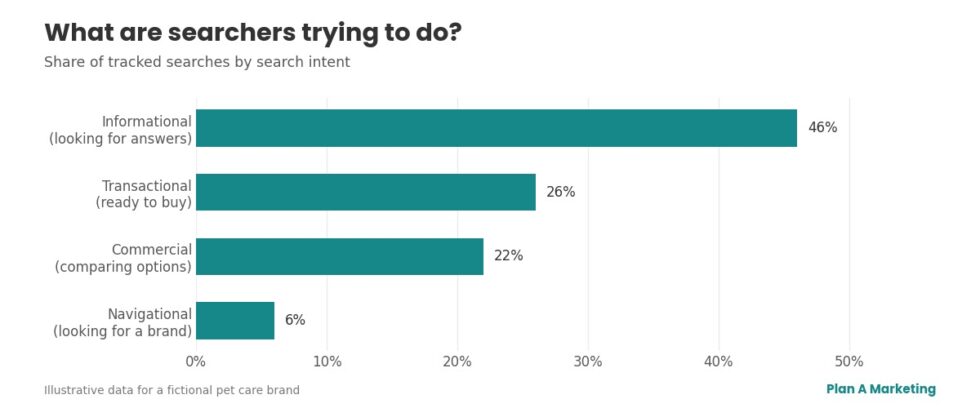
Grouping by intent shows whether you’re visible when people are researching, comparing or ready to buy, and where the gaps are.
<img src=”kseg-chart-3-search-intent.jpg” alt=”Bar chart of tracked searches by search intent: informational 46%, transactional 26%, commercial 22%, navigational 6%” width=”1200″ loading=”lazy” />
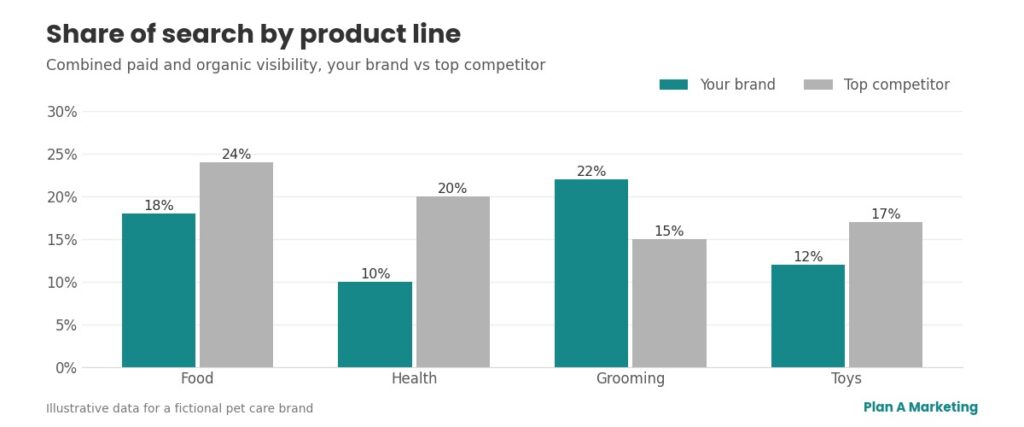
Segmenting competitor visibility
Segmentation gets even more powerful when you apply it to competitors. Combine paid and organic visibility by product line and you get a “share of shelf” view of search. Telling an MD that their pet health range has 10% visibility while the main competitor has 20% will get a reaction. Telling them they’ve dropped two places for one keyphrase won’t.
Layer on animal type
Now combine product type with animal type. In our example, this might reveal large demand for dog health terms but comparatively little for cat health. That’s a content and budget decision, not a ranking report.
Segment by search intent
Search intent is what the person is trying to do:
- Informational: looking for an answer (“how often to worm a puppy”).
- Commercial: comparing options (“best grain-free dog food”).
- Transactional: ready to buy (“buy cat litter online”).
- Navigational: looking for a specific brand or site.
Grouping by intent shows whether you’re visible when people are researching, comparing or ready to buy, and where the gaps are.
Segmenting competitor visibility
Segmentation gets even more powerful when you apply it to competitors. Combine paid and organic visibility by product line and you get a “share of shelf” view of search. Telling an MD that their pet health range has 10% visibility while the main competitor has 20% will get a reaction. Telling them they’ve dropped two places for one keyphrase won’t.
Segmenting traffic reveals the real trend
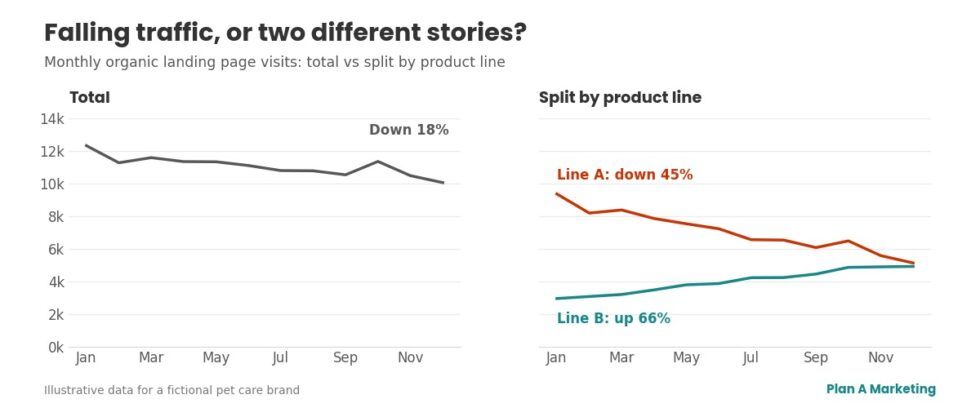
The same approach works on website traffic. Picture a brand whose total organic landing page traffic is falling year on year. On the surface, that’s a decline.
Now split those landing pages by product line. One line is falling sharply while the other is growing. The overall trend was hiding two different stories that need two different fixes. Looking only at the headline figures, or at individual keyphrases, would never have shown that.
How to start segmenting your own data
You don’t need expensive tools. Here’s a practical starting point:
- Export your data. Download queries and landing pages from the Performance report in Google Search Console.
- Choose three or four labels. Product or service line, location, customer type and search intent work for most businesses.
- Tag every row in a spreadsheet.
- Build a pivot table showing clicks, impressions and conversions by segment.
- Compare KPIs by segment, such as conversion rate, engagement rate and pages per session. You’ll often find they vary dramatically by intent or customer type.
- Make it repeatable. Use regex filters in Search Console, content groups in Google Analytics 4 and labels in Google Ads so the segments update automatically.
If you want the fundamentals first, our guide on how SEO works covers the basics, and website traffic but no leads shows what to look at when visits aren’t turning into enquiries.
Why keyword segmentation matters for AI search too
AI-powered search tools, such as Google’s AI Overviews and ChatGPT, answer questions by topic rather than by exact keyword. Segmenting your keyphrases by topic and intent shows you which subjects you cover well and which you barely touch, which is exactly where AI-generated answers will look elsewhere.
Key takeaways
- Keyword segmentation groups search terms by business labels, not just rankings.
- Decision-makers care about product lines, competitors and sales, not individual keyphrases.
- Layering segments (product, customer, intent) reveals opportunities a keyword list hides.
- Segmenting traffic can expose opposite trends hidden inside one headline figure.
- A Search Console export and a spreadsheet are enough to start.
Start with your top landing pages. Segment them, compare them against conversion rate and engagement, and see what stories surface. Do dog owners read more than cat owners? Do puppy owners leave faster than owners of senior dogs? Go and find out.
Frequently Asked Questions
Keyword segmentation is the practice of tagging each search term you track with business labels, such as product line, customer type or buying intent. You then report on those groups rather than on individual keywords. It turns a long list of rankings into a clear picture of where demand, visibility and sales opportunities sit across the business.
Customer segmentation groups the people who buy from you, for example by how recently, how often and how much they spend. Keyword segmentation groups the searches people make before they find you. The two work well together: keyword segments show what different groups are looking for, and customer segments show who actually converts.
Start with three or four labels that mirror how the business is organised and how decisions get made. Product or service line, location, customer type and search intent (researching, comparing or ready to buy) are good starting points. If a label would not change a decision, leave it out.
No. An export from Google Search Console, a spreadsheet and a pivot table will get you most of the way. Search Console's regex filters, content groups in Google Analytics 4 and labels in Google Ads can then make the segments repeatable, all at no extra cost.
A monthly look at the headline segments is usually enough to spot trends early. Every quarter, go deeper and compare segments against conversion rate and engagement to decide where to focus content and budget. Revisit the labels themselves whenever you add a new product or service.
Stop guessing why you’re not getting more customers.
If your website, Google Business Profile, PPC or anything else you’re running isn’t bringing in calls, leads or sales, we can tell you exactly why. For a fixed fee of £699, Nick will personally give it a complete, plain-English once-over — hands-on and experienced, never automated — and hand you a prioritised action list of fixes.
From there, you decide how to execute it: do it yourself, let us teach your team, or have us do it for you.

Or request an informal call back with Nick